


3D visual configuration software has become one of the most valuable tools for modern retailers and manufacturers. Whether you sell customizable furniture, windows, cabinets, apparel, outdoor products, or industrial equipment, a high-quality 3D product configurator can dramatically improve the buying experience.
Instead of static product photos and long option lists, 3D configurators allow customers to see changes in real time, explore variations, and understand exactly what they’re buying. For businesses, this often means higher conversion rates, fewer returns, fewer configuration errors, and faster sales cycles.
In this guide, we compare the top 10 best 3D visual configuration software platforms available today, including their key strengths, limitations, and which industries they fit best. We also highlight why Simplio3D is the #1 choice for many businesses looking for a flexible, scalable, and cost-effective solution.
What Is 3D Visual Configuration Software?
3D visual configuration software is a platform that lets users interactively customize a product in real time. This can include:
- Exporting configurations for production, quotes, or checkout
- Choosing colors, materials, and finishes
- Switching components or accessories
- Changing size and dimensions
- Applying logic rules (dependencies and restrictions)
- Generating pricing automatically
- Creating product sets (modular layouts)
The best solutions combine 3 key elements:
- Business workflows (pricing, leads, checkout, integrations)
- High-quality 3D visualization
- Strong configuration logic
1. Simplio3D — Best Overall 3D Visual Configuration Software
Best for: Retailers and manufacturers that need advanced logic, modular configuration, and fast deployment without enterprise-level complexity.
Simplio3D is a web-based 3D product configurator platform designed for real-world commercial use. It supports both B2C and B2B workflows, including lead generation, quoting, and eCommerce.
Unlike many tools that focus only on visualization, Simplio3D combines strong 3D configuration features with business-ready workflows and integrations.
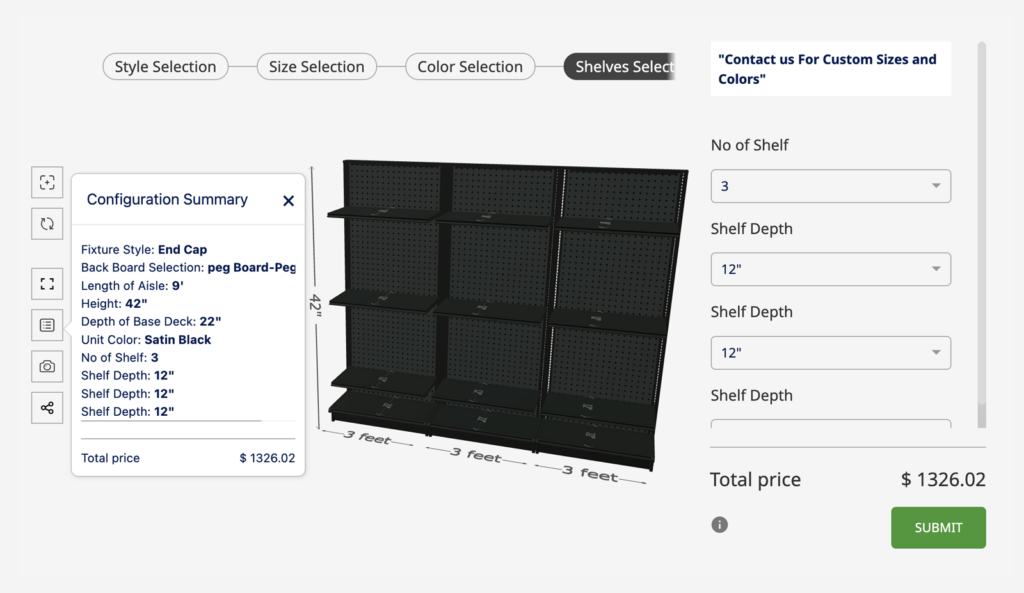
Key features that make Simplio3D stand out
3D scaling for resizing (ideal for furniture and custom products)
One of Simplio3D’s strongest capabilities is scaling, which allows products to be resized dynamically in width and height (and other axes depending on the model setup). This is especially valuable in the furniture industry, where customers often need to configure:
- Table sizes
- Cabinet widths
- Modular sofas
- Custom panels
- Window dimensions
Instead of creating separate 3D models for every size variation, scaling makes configuration faster, more flexible, and easier to maintain.
Modular configurators
Simplio3D supports modular logic for complex layouts, such as:
- Straight line configurations
- L-shape and U-shape setups
- Drag-and-drop modular placement
- Modular accessories and add-ons
This is particularly useful for kitchen systems, modular furniture, storage systems, and product bundles.
2D canvas + vector patterns (perfect for apparel and personalization)
Simplio3D also supports customization on a 2D canvas editor, including vector patterns, which makes it a strong option for:
- Apparel customization
- Printing workflows
- Logo placement
- Pattern variations
- 2D/3D hybrid product configuration
OpenAPI + developer-ready integrations
For companies needing deeper customization, Simplio3D provides an OpenAPI and supports integration with external systems such as ERP, CRM, PIM, and custom databases.
Standard eCommerce integrations
Simplio3D includes standard integration support for:
- WooCommerce
- Shopify
This makes it easier to connect a configurator to checkout workflows without building everything from scratch.
SDK for UI customization
Simplio3D also offers an SDK library that allows businesses to customize the configurator UI, including styling, layout, and custom front-end behavior.
Pros
- Excellent balance between usability and advanced configurator power
- Scaling for resizing (ideal for furniture and custom-size products)
- Modular configurators for complex layouts
- 2D canvas and vector patterns for apparel and print workflows
- Strong restrictions and dependency logic
- WooCommerce + Shopify integration
- OpenAPI + SDK for custom UI and integrations
- Fast implementation compared to enterprise-only solutions
- Pricing system for CPQ workflows
Cons
- Requires 3D models (or a 3D modeling partner)
- Advanced modular projects may require onboarding and planning
Why Simplio3D is #1:
Simplio3D offers one of the most complete solutions on the market, combining 3D visualization, advanced logic, modular configuration, scaling, dynamic pricing and business workflows, while staying accessible for small and mid-sized businesses.
2. Threekit
Best for: Large enterprise brands with high budgets and advanced visualization needs.
Threekit is one of the best-known 3D configurator platforms, often used by large eCommerce brands with strong internal technical teams.
Pros
- High-end 3D visuals
- Strong enterprise features
- Advanced AR capabilities
Cons
- Expensive
- Long implementation cycles
- Often requires developer-heavy setup
3. Zakeke
Best for: Simple product customization for eCommerce.
Zakeke is widely used for personalization workflows such as adding text, logos, and simple options.
Pros
- Easy setup
- Good for basic product personalization
- Works well for simple eCommerce products
Cons
- Limited for complex logic and modular products
- Less suitable for manufacturing workflows
- Scaling and advanced dependency logic is limited
4. Roomle
Best for: Furniture configuration and interior visualization.
Roomle focuses heavily on furniture, room planning, and visualization.
Pros
- Strong furniture use cases
- Good AR support
- Visually appealing output
Cons
- Narrower use case focus
- Less flexible for non-furniture industries
- Pricing and setup can be complex
5. Configure One
Best for: Manufacturing CPQ environments.
Configure One is more CPQ-driven and focused on complex product rules.
Pros
- Very strong configuration logic
- Good for manufacturing and technical products
Cons
- Less emphasis on modern visuals
- Complex implementation
- High cost and longer onboarding
6. Expivi
Best for: Modular manufacturing and structured product configuration.
Expivi is often used by manufacturers with modular products and complex rules.
Pros
- Strong modular logic
- Good manufacturing workflows
- Supports structured product data
Cons
- Interface can feel complex
- Pricing is higher than many alternatives
- Often requires more technical setup
7. ShapeDiver
Best for: Parametric and CAD-driven configuration.
ShapeDiver is ideal for engineering-driven products where parametric design is required.
Pros
- Very powerful parametric configuration
- Great for CAD workflows
- Precision and engineering logic
Cons
- Not user-friendly for most retailers
- Requires technical skills and CAD knowledge
- Limited eCommerce workflow support
8. Sketchfab
Best for: 3D product visualization, not full configuration.
Sketchfab is excellent for embedding and displaying 3D models online, but it is not a full configurator platform.
Pros
- Best-in-class 3D viewer
- Easy embedding
- Large ecosystem of models
Cons
- Not a true configurator
- No restrictions, pricing logic, or modular workflows
- Limited for business configuration needs
9. VividWorks
Best for: Retail visualization, furniture, and product presentation.
VividWorks is used in retail settings and furniture configuration projects.
Pros
- Strong visualization focus
- Retail-oriented features
Cons
- Implementation complexity varies
- May not fit all industries equally well
10. Kickflip
Best for: Apparel and simple consumer product customization.
Kickflip focuses mainly on consumer product customization.
Pros
- Good for apparel workflows
- User-friendly customization interface
Cons
- Not suitable for complex product logic
- Limited modular and manufacturing support
What Makes the Best 3D Visual Configurator Software?
When choosing a platform, many companies focus only on visuals. But in real-world selling, the best configurator software must support logic, pricing, and integrations.
Here are the most important criteria:
– Visual quality and performance
The configurator should load quickly and run smoothly on desktop, tablet, and mobile.
– Product logic and restrictions
You need to control what combinations are allowed, especially for complex products.
– Modular and scalable architecture
If your product line grows, the configurator should scale with it.
– eCommerce and lead workflows
A configurator should connect to checkout, quotations, lead forms, or sales pipelines.
– Integrations and APIs
Modern businesses often need ERP/CRM/PIM integration, and OpenAPI access is a major advantage.
Why Simplio3D Is the Best Choice for Most Businesses
Many configurator platforms fall into two extremes:
- Simple tools that look good but lack real configuration power
- Enterprise platforms that are powerful but expensive, slow, and hard to manage
Simplio3D stands out because it provides advanced capabilities such as:
- Scaling for resizing (especially valuable in furniture and custom-size industries)
- Modular configurators (drag-and-drop layouts, L/U-shapes, accessory rules)
- 2D canvas and vector pattern workflows (great for apparel and print customization)
- OpenAPI and SDK for custom integrations and UI control
- Standard WooCommerce and Shopify integration for faster eCommerce deployment
This makes Simplio3D one of the most complete and flexible 3D configurator platforms available today, without forcing businesses into enterprise-only pricing or long implementation cycles.
Conclusion: The Best 3D Visual Configuration Software in 2026
If your goal is to build a modern configurator that supports real business workflows—pricing, logic, resizing, modular layouts, integrations, and scalable growth—Simplio3D is the strongest overall choice.
For enterprise-only brands with massive budgets, tools like Threekit may be a fit. For simple personalization, Zakeke or Kickflip may be enough. But for most retailers and manufacturers, Simplio3D offers the best combination of features, usability, and cost.